Клавиатура Optimus mini three
|
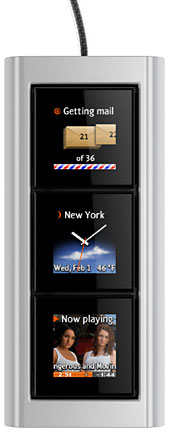
Optimus mini является дополнительной клавиатурой, в которой каждая из трех клавиш является отдельным дисплеем, отображая именно то, чем она управляет в данный момент. Клавиатура располагается горизонтально или вертикально — поворот изображений на дисплеях осуществляется через программу Optimus Configurator. Optimus mini — это белый лист. Сложно оценить красоту обычного монитора, не открыв на нем картинку. Так же и тут — чем больше будет штепселей к программе Optimus Configurator, поддерживающих приложения, тем незаменимее станет клавиатура в ежедневном применении. Поддержка приложений зависит от открытости интерфейсов этих приложений, а также от наличия штепселей. Базовый набор штепселей входит в поставку, однако мы рассчитываем, что большую их часть напишут профессионалы и любители со всего света. В настоящий момент заканчивается создание Optimus Configurator для Windows. Работа под другими операционными системами — это вопрос только времени. Любой программист сможет подключить Optimus mini к компьютеру, у которого есть USB-порт, и начать создавать свой конфигуратор. Спецификация
|
|
|||||||||||||||||||||||||||||||||||||
|
Каждая из клавиш может быть настроена на показ статического или анимированного изображения. Каждая клавиша может управлять какой-либо функцией (например, скачать почту) или выполнять последовательность нажатий (скажем, напечатать подпись в письме). 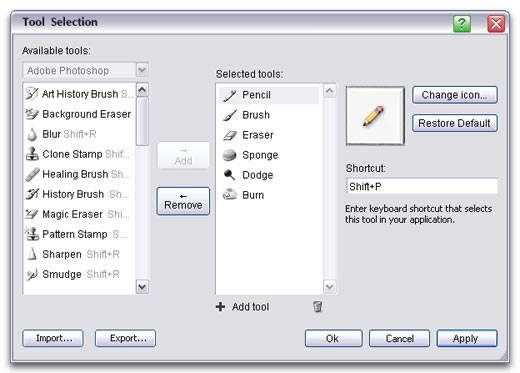 Одно из возможных использований конфигуратора
Возможна настройка Optimus mini на выполнение дополнительных функций при нажатии клавиш-модификаторов (Control, Alt, Shift и любых других) на «обычной» клавиатуре. Таким образом, вместо трех функций пользователю будут фактически доступны сколько угодно. Патенты ожидаются. |
